8.9 Release Highlights
WHMCS 8.9 introduced new PayPal® payment gateway modules, extended on-demand renewals to allow early renewals for product addons, and separated admin abilities to view and manage invoices.
PayPal Payments
According to PayPal’s research, 49% of PayPal users abandon their purchases if PayPal isn’t a payment option. The new PayPal Payments payment gateway module helps you maximize your business success with support for disputes and displaying balances in the WHMCS Admin Area, PayPal Smart Button payments in the Client Area checkout, and the safety of PayPal’s latest secure tokenization system.
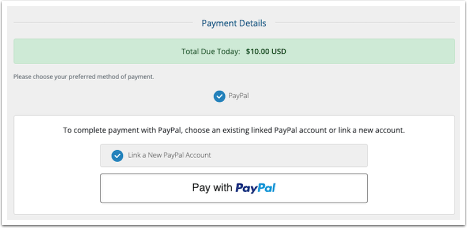
When you enable PayPal Payments, PayPal Smart Buttons allow clients to make one-click payments, including payment with credit and debit cards, during checkout and on invoices.
The additional PayPal Card Payments module automatically activates when you enable PayPal Payments, giving you the choice to display a separate unbranded option that accepts credit and debit cards using PayPal Advanced Checkout.
You can enable PayPal Payments and PayPal Card Payments at Configuration () > Apps & Integrations.
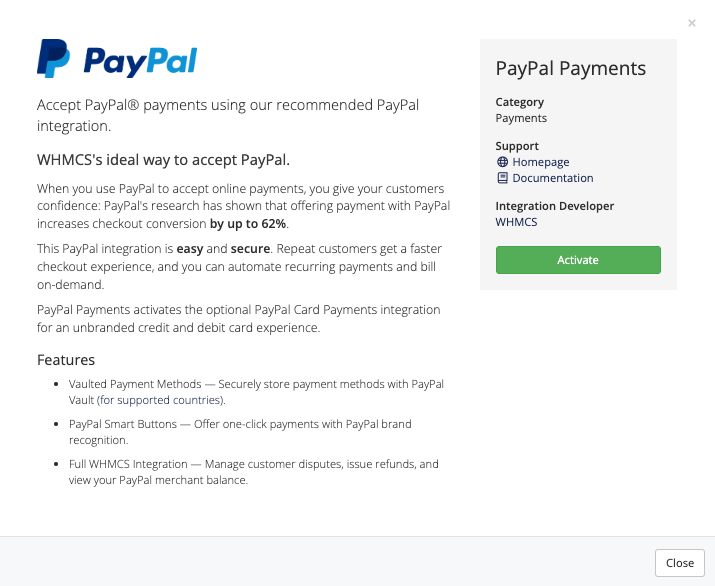
The PayPal Payments modules also ensure the security of your customers’ stored payment details with merchant-level vaulting through PayPal Vault.
PayPal currently enables vaulting for merchants in the following countries:
Afghanistan, Albania, Algeria, Andorra, Angola, Anguilla, Antigua and Barbuda, Argentina, Armenia, Aruba, Australia, Austria, Azerbaijan, Bahamas, Bahrain, Bangladesh, Barbados, Belarus, Belgium, Belize, Benin, Bermuda, Bolivia, Bonaire, Sint Eustatius and Saba, Bosnia and Herzegovina, Botswana, Brazil, British Virgin Islands, Brunei Darussalam, Bulgaria, Burkina Faso, Cabo Verde, Cambodia, Cameroon, Canada, the Cayman Islands, the Central African Republic, Chile, China, Colombia, the Cook Islands, Costa Rica, Croatia, Côte d’Ivoire, Curaçao, Cyprus, Czech Republic, the Democratic Republic of the Congo, Denmark, Dominica, the Dominican Republic, Ecuador, Egypt, El Salvador, Estonia, Eswatini, Ethiopia, Falkland Islands, Faroe Islands, the Federated States of Micronesia, Fiji, Finland, France, French Guiana, French Polynesia, Georgia, Germany, Ghana, Gibraltar, Greece, Greenland, Grenada, Guadeloupe, Guatemala, Guernsey, Guinea, Guyana, Haiti, Honduras, Hong Kong, Hungary, Iceland, India, Indonesia, Iraq, Ireland, Isle of Man, Israel, Italy, Jamaica, Jersey, Jordan, Kazakhstan, Kenya, Kiribati, Kosovo, Kuwait, Laos, Latvia, Lebanon, Lesotho, Liberia, Libya, Liechtenstein, Lithuania, Luxembourg, Madagascar, Malawi, Malaysia, Maldives, Mali, Malta, the Marshall Islands, Martinique, Mauritius, Mexico, Moldova, Monaco, Mongolia, Montenegro, Montserrat, Morocco, Mozambique, Namibia, Nauru, Nepal, Netherlands, New Caledonia, New Zealand, Nicaragua, Niger, Nigeria, Niue, Norfolk Island, North Macedonia, Norway, Oman, Pakistan, Palau, Palestine, Panama, Papua New Guinea, Paraguay, Peru, Philippines, Pitcairn Islands, Poland, Portugal, Qatar, the Republic of Korea, Réunion, Romania, Rwanda, Saint Barthélemy, Saint Kitts and Nevis, Saint Lucia, Saint Martin (French part), Saint Pierre and Miquelon, Samoa, San Marino, São Tomé and Príncipe, Saudi Arabia, Senegal, Serbia, Seychelles, Singapore, Sint Maarten (Dutch part), Slovakia, Slovenia, Solomon Islands, Somalia, South Africa, Spain, Sri Lanka, Suriname, Svalbard and Jan Mayen, Sweden, Switzerland, Taiwan, Tajikistan, Tanzania, Thailand, Togo, Tonga, Trinidad and Tobago, Tunisia, Turkmenistan, the Turks and Caicos Islands, Tuvalu, Uganda, the United Arab Emirates, the United Kingdom, the United States, the United States Minor Outlying Islands, Uruguay, Uzbekistan, Vanuatu, Vatican City, Venezuela, Vietnam, Yemen, and Zimbabwe.
On-Demand Renewals
WHMCS 8.9 extends the on-demand renewals feature to include product addons. On-demand renewals make it easy for your customers to renew eligible items before WHMCS generates their next invoice. These renewals require no manual intervention from you, helping you reduce customer support needs while retaining existing customers and avoiding missed due dates.
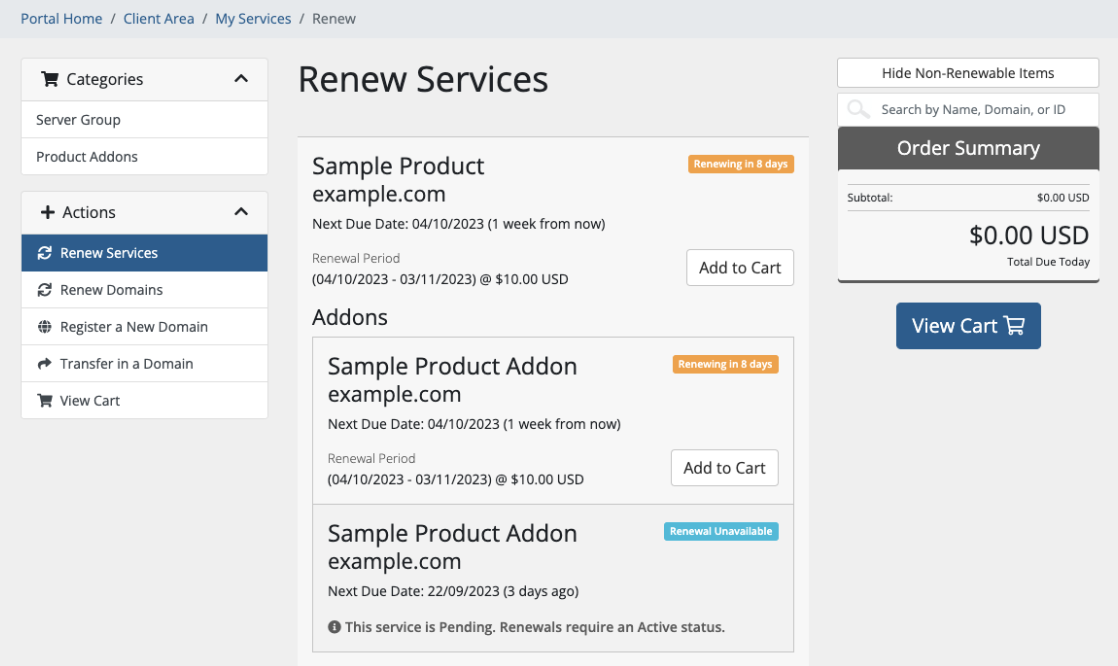
You can configure on-demand renewals globally, for all eligible products and product addons on your WHMCS installation, and configure them further on a per-product and per-addon basis.
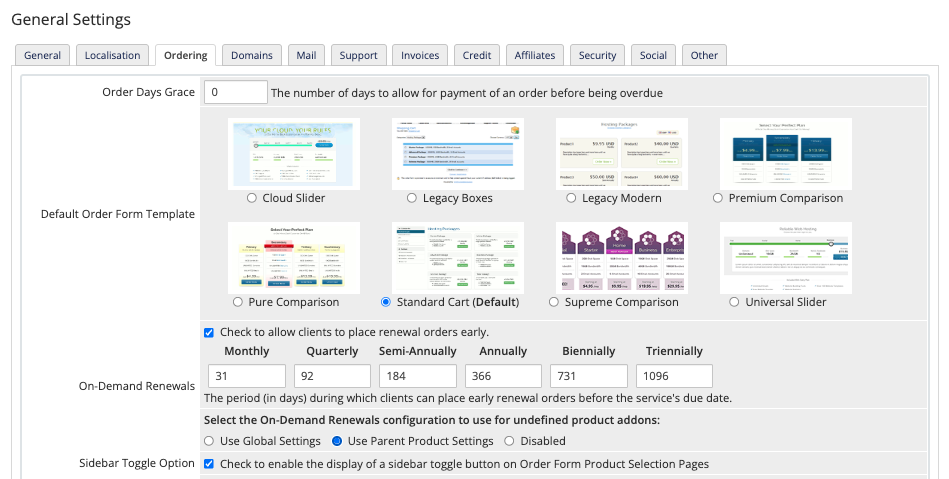
Get started configuring the global on-demand renewal settings for product addons in the Ordering tab at Configuration () > System Settings > General Settings.
Separate Invoice Viewing and Management
Unintentionally editing an invoice can cause serious issues, and the ability to edit them is not necessary for every member of your staff.
To help prevent these problems before they happen, we have added a default view-only mode for invoices and implemented a separate View Invoices administrator role permission.
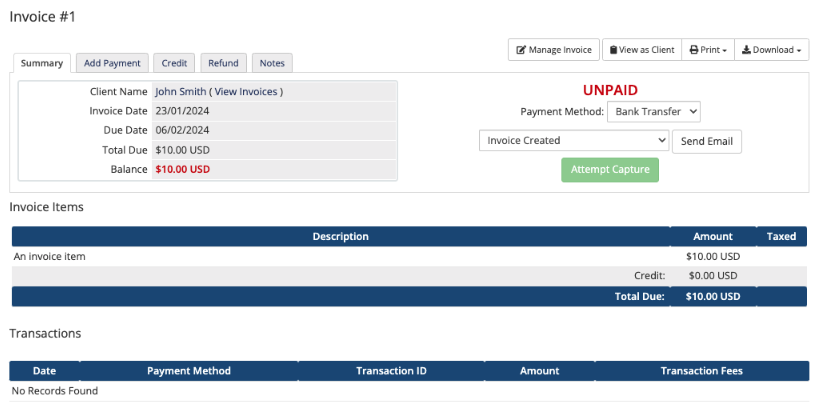
By default, viewing an invoice in the Admin Area now takes you to the invoice in view-only mode, where you can view invoice contents, resend emails, add payments and credits, and issue refunds if you have the required permissions for those tasks.
To add or delete invoice items, split the invoice, or cancel it, you must first click Manage Invoice to enter invoice management mode. Admins who already had the Manage Invoices permission in WHMCS 8.8 and earlier will continue to be able to view and edit invoices.
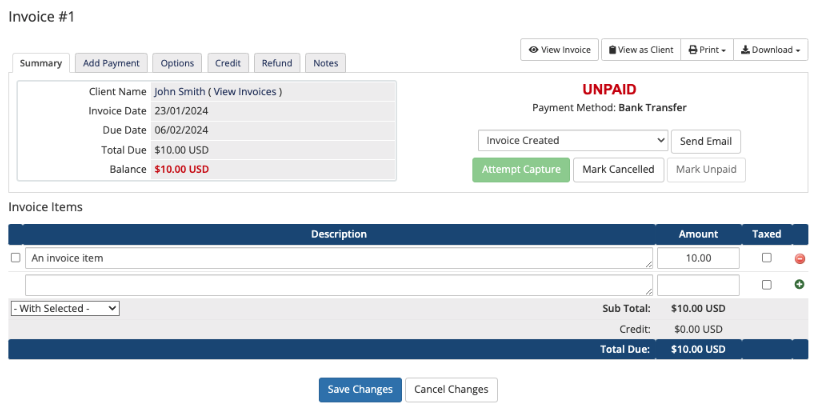
To adjust the permissions for your staff, go to Configuration () > System Settings > Administrator Roles after you complete the WHMCS 8.9 update.
Updating to WHMCS 8.9
To take advantage of these changes, you need to update to WHMCS 8.9.
We recommend making sure your customizations are up-to-date for the new version and checking the compatibility of any third-party modules you use.
Last modified: 2025 November 14